MT5 Risk Management EA · Trade Manager You pick the direction. The assistant manages the trade.
A complete risk and money management trade panel on your MetaTrader 5 chart. Choose Buy or Sell, set entry, stop and target on the chart, and the lot size is calculated from your risk. Once you're in, everything from breakeven to closing is done from the same panel.
- MetaTrader 5
- Risk-based lot size
- Breakeven · Profit lock
- AIAuto autopilot
- Works in the Strategy Tester
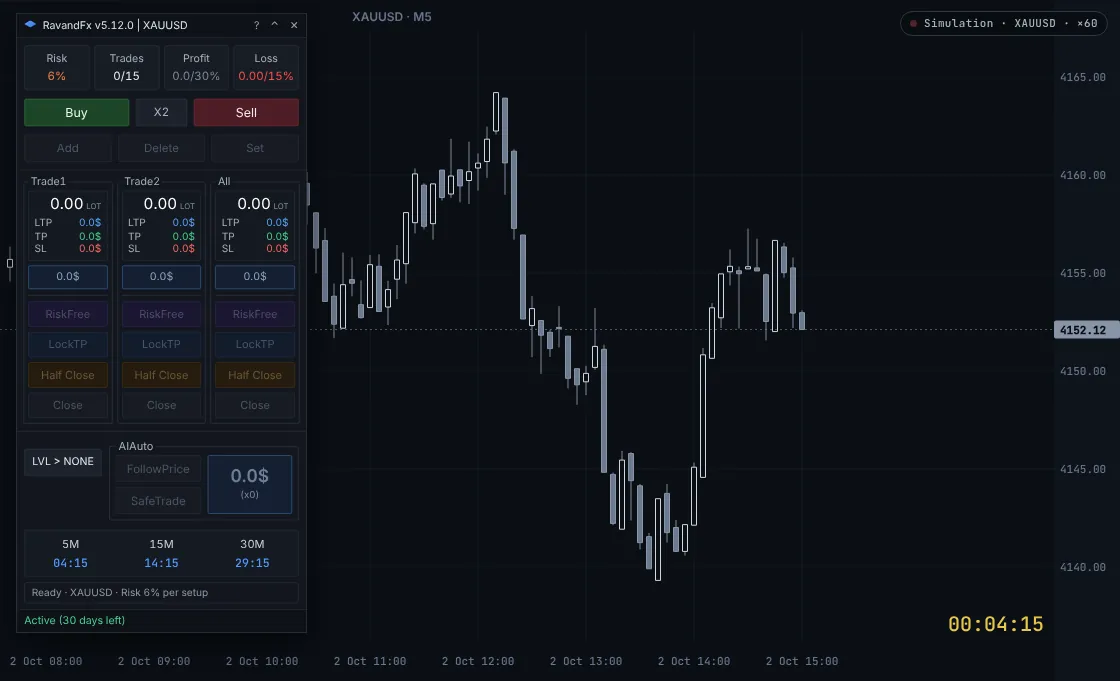
This is a live simulation of the panel, with simulated gold prices and time running 60× faster (faster still while you're away). Click any button, or drag the entry, stop and target lines.
Want to try everything yourself? Open the full simulator: a live chart, every panel button and your money-management rules, with no install and no risk.
Open the full simulatorEntry · the workflow
From idea to managed trade in four moves
You choose the direction and the entry. Then hand everything over to the assistant.
- 01 · Plan
Pick a direction
Select Buy or Sell. Turn on X2 if you want to give one trade idea two chances to enter.
BuyX2Sell - 02 · Place
Set it on the chart
Press Add and everything you need appears on the chart. Drag the lines and the lot size and money at risk update instantly.
AddDeleteSet - 03 · Manage
Protect what you have
Move the stop to breakeven, lock a dollar profit, take half off, or close. Per trade or for all of them at once.
RiskFreeLockTPHalf CloseClose - 04 · Autopilot
Smart management
FollowPrice follows the price and manages the trade until it closes. With SafeTrade on, it opens a new trade in your direction when conditions are good.
FollowPriceSafeTrade
SL · lot size calculator
Automatic lot size: every position sized from your risk, never from a guess
Set your risk per trade once, for example 6% of balance. From then on, wherever you put the stop, the lot size is calculated so that if the stop is hit you lose about that amount and no more. Move the stop further away and the lot size shrinks. Bring it closer and the size grows. The money at risk stays the same.
lots = (balance × risk%) ÷ (stop distance × value per 1.00 move)
The labels on the chart show it all before you commit: lots, entry price, reward-to-risk, and for the stop and target the dollar amount, percent of balance and distance in points.
| Stop distance | Points | Lot size | Loss at stop |
|---|---|---|---|
| 5.00 | 500 | 0.60 | −$300.00 |
| 10.00 | 1000 | 0.30 | −$300.00 |
| 15.00 | 1500 | 0.20 | −$300.00 |
| 23.00 | 2300 | 0.13 | −$299.00 |
Drag the entry, get the right order type
Leave the entry on the current price and Set opens the trade right away. Drag it away and the order becomes a limit or a stop, depending on which side of price it sits.
X2: one trade idea, two chances to enter, one risk budget
With X2 on, the risk you set is split across Trade 1 and Trade 2. Each column of the panel shows its own lots, target, stop and live result, and the All column adds them up. Now the whole position is clear at a glance.
Strategy Tester · manual backtesting
Practise your strategy in the Strategy Tester
RavandFX also works in the MetaTrader 5 Strategy Tester. Trade real historical data with the same panel and the same money-management rules: speed time up or slow it down, pause wherever you like, and live through months of trading in a few hours. Almost like the live market, without risking a single dollar.
In three steps
- Open the Strategy Tester
In MetaTrader 5 open
View → Strategy Tester(orCtrl+R) and choose RavandFX as the Expert. - Turn on Visual mode
Pick the symbol, timeframe and date range, turn on Visual mode and press Start.
- Trade it like the live market
Price moves on the chart and you trade with the panel: enter, drag your stop, move to breakeven and lock profit.
Your own broker's real data
Practise on the same prices, spreads and market hours you will trade later, not on made-up data.
Every panel feature
Lot sizing, RiskFree, LockTP, half close, the autopilot, FastScalp and the money-management rules all work in the tester too.
Practise discipline, not just the strategy
Train with a fixed risk, daily limits and a pause after every trade, so the habit is already there before real money or a prop challenge.
Free, no licence needed
Using RavandFX in the Strategy Tester is free and needs no licence. Buy one when you're ready for a live account.
TP · trade management
Buttons that light up when they make sense
Each trade column has four controls. They stay grey until the market allows them, so the panel itself tells you what you can do next.
Breakeven with costs included
Moves the stop to your entry plus commission, estimated exit charges and swap. It becomes available once price is far enough from entry for the broker to accept the new stop.
Lock a dollar profit
When the open profit reaches your LTP amount, LockTP lights up. One click moves the stop to the price that keeps that profit.
Take half off
Closes half the volume. It is only active when both halves meet the broker's minimum lot.
Exit now
Closes the trade at market, or cancels it while it is still a pending order. Use the All column to act on every trade together.
AIAuto · autopilot
Open the trade and walk away.
You can't watch the chart all day. Open the trade, switch on AIAuto and hand it to the assistant. Whenever it sees the trend turning, or finds a safe level for the stop, it moves the stop there. When conditions are right, it can also open a new trade in the direction you chose, with money management applied and everything under control.
- For when you're away from the chartAt work, in a meeting or asleep, your trade is still managed.
- Trend turning? The stop movesThe assistant spots the turn and protects your profit.
- Only in your directionIt never opens a trade against the direction you chose.
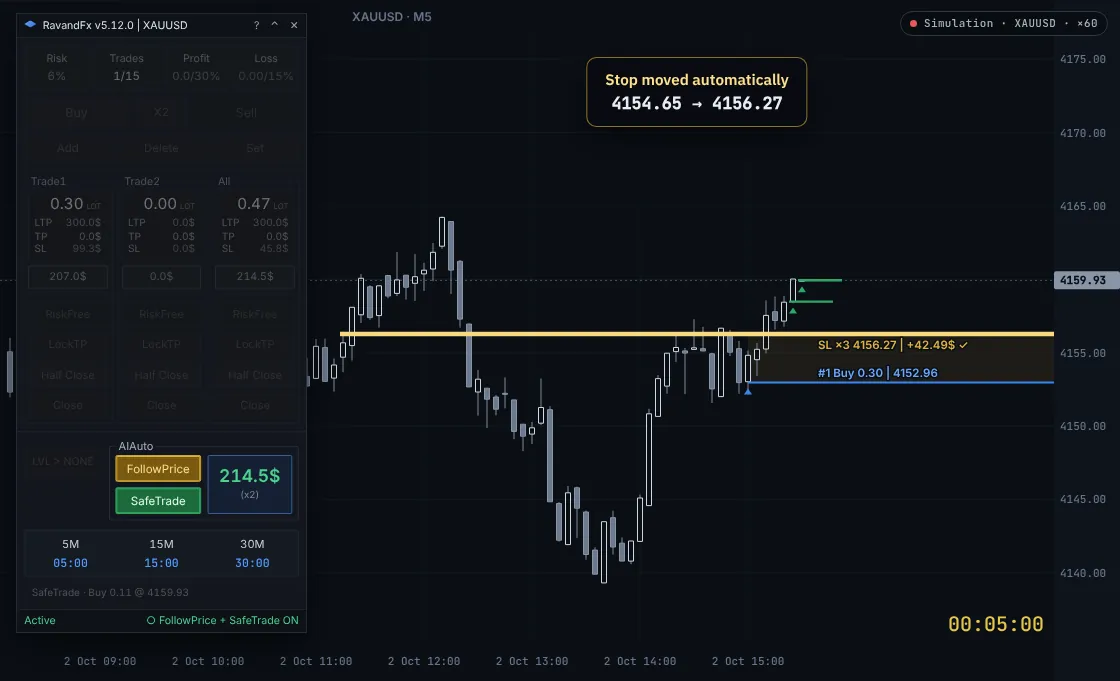
Just follow the price
Don't want any new trades? Turn on FollowPrice alone. It follows the price intelligently and closes your trade at the best price it can get, without opening a single new trade.
Get more from a good move
Add SafeTrade and, whenever the market offers a good opportunity, it opens a measured trade in the same direction as yours, with everything kept under control.
Simulated prices and compressed time. One possible path, shown for illustration. Turn FollowPrice and SafeTrade off close to high-impact news.
Rules · forex money management
Forex money management rules, enforced on every trade
Most big losses start with one emotional decision: a stop dragged further away, a trade opened after a bad day, an entry right before the news. The assistant stops exactly these.
Stop-loss lock
With the stop-loss lock on, you can't move the stop by hand. It only changes through the panel's buttons or the autopilot, and only in your favour.
Daily profit and loss limits
Set a daily loss limit and a daily profit target. Once either is reached, the assistant won't let you open a new trade for the rest of the day.
Daily trade limit
Set how many trades you're allowed per day. After that, the panel won't open new trades, so you don't overtrade.
Panel lock
Lock the panel so you can't open a trade, for example before the news. Nothing new is placed until you unlock it.
Three rules for when excitement wants to make the call
Enter only on the M5 candle close
Turn this rule on and the assistant only lets you enter as the 5-minute candle closes. No more jumping in halfway through an exciting candle: you wait for it to finish, then decide.
A forced pause after every trade
Just closed a trade and want to win it back fast? Turn on the entry lock and choose how many minutes you're blocked from opening a new position after each trade closes, for example 5. That short pause is enough to stop a revenge trade.
Lot size capped by your balance
Decide the maximum volume each slice of your balance allows, for example 0.01 lot per $100. Even with a very tight stop, no trade gets oversized. With $5,000, no trade goes above 0.50 lot, even with a 2-dollar stop.
Panel · fast tools
Speed in and out, with money management still in place
FastScalp: one key in, one key out
When you scalp, every second counts. With FastScalp you enter with a single key, at a lot size calculated from your risk, and close every trade with another. Fast, and still money-managed.
Three candle timers
Countdowns to the close of three timeframes at once. Click a timer to switch it to another timeframe.
Key levels of the day
Show the previous day's high and low, or the Asia and London session ranges, with one button.
Daily limits in view
The top row of the panel always shows your risk per trade, trades taken today, and daily profit and loss next to their limits.
Trade log
Every trade, stop move and cost is saved to a CSV file, so you can review how each trade was managed.
Setup · about five minutes
Install in MetaTrader 5
Download and copy the file
Download the latest version from My licence. In MetaTrader 5 open
File → Open Data Folder, thenMQL5/Experts, and paste the RavandFX.ex5file. Refresh the Navigator.Allow algo trading and the licence check
In
Tools → Options → Expert Advisorsenable Algo Trading and addhttps://my.ravandfx.comto the WebRequest list. That is where the assistant checks your licence.Attach it to a chart
Drag RavandFX onto the chart of the symbol you trade. The panel opens on the chart.
Licence
Your licence key arrives by email after purchase. Enter it in the assistant's settings, in the
licenceKeyfield. The licence status and days left are shown at the bottom of the panel.
Before you start
- Trading knowledge. The assistant is a money-management tool, not a replacement for analysis. You choose the direction and the entry, so you need to understand the market, stop losses and risk.
- Understanding the risk. Your capital is always at risk when trading, and you can lose some or all of it. Only trade money you can afford to lose.
- MetaTrader 5 on Windows. If you want your trades managed while your computer is off, you need a Windows VPS.
- A stable connection. The assistant must stay connected to your broker to manage trades.
- A hedging account. Recommended for X2 and SafeTrade.
- Practice on demo. Spend a few days with the assistant on a demo account before trading real money.
Discipline · risk management
Like a mentor watching every trade you take
The most important rule in trading is sticking to your money-management rules. Everyone knows it, and on a bad day almost nobody does it. You choose your rules once, with a clear head, and RavandFX locks them into your licence. From then on you trade by them. Your trading gets order, and emotion stops making the decisions for you.
RavandFX stops these:
- ✕
More risk, just this onceEvery trade opens at exactly the risk percent you set, never more.
- ✕
Going in with a heavy lotThe lot cap, based on your balance, keeps the size sensible even with a very tight stop.
- ✕
Nudging the stop a little furtherThe stop is locked and only moves in your favour.
- ✕
A revenge trade after a lossAfter every trade there's a forced pause, so you come back with a clear head.
- ✕
One more trade, then anotherOnce you reach your daily trade limit, no new trade opens until tomorrow.
- ✕
Pushing on through a bad dayHit your daily loss limit and your day is over. Hit your profit target and you keep the profit.
- Risk per trade
- 2%
- Trades per day
- 6
- Daily profit target
- 8%
- Daily loss limit
- 6%
- Lot cap
- 0.01 lot per $100
- Pause after a trade
- 10 min
- Stop-loss lock
- On
Trust
Peace of mind, on every front
RavandFX is a tool on your own MetaTrader. It never touches your money, never asks for your account password, and never opens a trade outside your rules.
We never ask for your password
Your licence only needs your email and MT5 account number. We never ask for your MetaTrader login password or your broker password.
Your money stays with your broker
We have no access to your trading account and can't deposit or withdraw anything. The assistant runs only on your own MetaTrader.
No high-risk trades
Every trade is sized from the risk you set and never goes above your lot cap or daily limits. You always open the first trade yourself, and the assistant never trades against your direction.
The real work happens on your computer
Lot sizing and trade management run inside the assistant itself. Our server only checks your licence, and if it can't be reached, the assistant keeps working normally for up to 72 hours.
A licence that can't be forged
Licence checks run over an encrypted connection (HTTPS) with a digital signature, so nobody can fake or tamper with them.
Try first, then buy
Try it free for 3 days with every feature. Nothing renews automatically, and if a technical problem on our side can't be fixed, we refund the remaining days.
Pricing
Try it free first, then choose
Free trial
$0
3 days
Every feature, no limits. One trial per MT5 account and per email. Make sure RavandFX fits the way you trade.
Start free trial1-month licence
$39
1 month
For your first month with real money. Every feature, with updates and support.
Buy 1 month3-month licence
$99$117
$33 / monthSave 15%
Every feature, with updates and support for 3 months.
Buy 3 months6-month licence
$149$234
under $25 / monthSave 36%
Every feature, with updates and support for 6 months. Only $50 more than 3 months, for twice the time.
Buy 6 monthsEvery feature is included in every plan:
- Lot sizing and X2
- Pending orders
- Breakeven, profit lock and half close
- AIAuto autopilot
- FastScalp
- Stop-loss lock and panel lock
- M5-close entries, entry lock and lot cap
- News alerts and daily limits
- Free use in the Strategy Tester
Prices in US dollars. Nothing renews automatically. After choosing a plan you set your money-management rules, and once you've paid your licence key is emailed to you.
If a technical problem on our side can't be fixed, we refund the remaining days. Money-back guarantee
Already a customer? Download the assistant and manage your licence in My licence
Before you start, know this
Trading financial markets, especially leveraged forex and gold, carries a high level of risk, and you may lose some or all of your capital. Entry decisions, direction and risk size are yours, and so is responsibility for the results.
RavandFX is a money-management tool, not a signal service or a promise of profit. Its job is to enforce the rules you set, without exception: the right lot size, a locked stop, daily limits and a pause after each trade. No software can guarantee profit, but losses that come from emotional decisions can be prevented.
Gaps, slippage and a slow broker can fill an order at a different price. Always practise on a demo account first, and only trade money you can afford to lose.
FAQ
Questions traders ask before they install
Can you access my account or my data?
No. Your licence only needs your email and MT5 account number, and we never ask for your MetaTrader or broker password. We have no access to your account and can't deposit or withdraw anything. The assistant runs on your own MetaTrader, and our server only checks your licence.
Does RavandFX open trades by itself?
No. You always open the first trade yourself. FollowPrice only manages trades you already have. If you also turn on SafeTrade, it can add trades in the same direction when conditions are right.
Can I open a trade and walk away from the chart?
Yes, that's what AIAuto is for. Turn on FollowPrice and the assistant takes over. Whenever it sees the trend turning or finds a safe level for the stop, it moves the stop. Just keep MetaTrader running and connected, and turn the autopilot off close to high-impact news.
How is the lot size calculated?
Balance × your risk percent, divided by the stop distance × the money value of one price unit on the symbol. With X2 on, the risk is split between two entries.
Does RiskFree mean the trade can't lose?
RiskFree moves the stop to your entry plus costs. If the stop fills at that price, the trade ends around zero. Gaps and slippage can still fill it at a worse price, so treat it as protection, not a guarantee.
Can SafeTrade increase my exposure?
Yes, that is what it's for. SafeTrade only works together with FollowPrice and only opens trades in the direction you chose, when conditions are right. If you don't want any extra trades, leave SafeTrade off and use FollowPrice alone.
Can I move the stop loss by hand?
Not while the stop-loss lock is on. The assistant keeps the stop where it is, so you don't make an emotional decision mid-trade. The stop only moves through the panel's buttons, such as RiskFree and LockTP, or through FollowPrice.
Should I use it during the news?
Better not. The assistant announces high-impact news and warns you. During the news most brokers slow down order execution, so avoid trading then and turn FollowPrice and SafeTrade off as the news approaches. If you don't want to be tempted, lock the panel so no new trade can be opened.
Can it help me keep prop firm rules, like a daily loss limit?
Yes, that is what the locked rules are for. Set a daily loss limit, a maximum number of trades and a risk per trade below your firm's limits, and once a limit is reached the panel blocks new trades for the rest of the day. Firms measure drawdown in different ways, often on equity, so read your firm's rules and leave a safety margin.
What happens when I hit my daily loss limit?
The assistant won't let you open a new trade for the rest of the day. The same applies to the daily profit target and the daily trade limit.
Why are the rules locked into the licence?
Because a rule you can switch off in the middle of a bad day isn't really a rule, and that is exactly where most big losses start. You choose the rules while you're calm, and RavandFX holds you to them like a mentor would, even when part of you wants something else.
Can I use RavandFX in the Strategy Tester?
Yes. In the MetaTrader 5 Strategy Tester's Visual mode every panel feature works: you trade historical data, the lot size comes from your risk, you can move to breakeven and you practise your money-management rules. Using it in the tester is free and needs no licence.
Is there a free version?
Yes. You can use the assistant free for 3 days with every feature. The trial is available once per MT5 account and per email. After that, buy a 1-month, 3-month or 6-month licence. Every plan has the same features, and nothing renews automatically.
Does MetaTrader have to stay open?
For the panel and the autopilot, yes: MetaTrader must be running and connected. A Windows VPS is the usual solution. Stops and targets that the broker already accepted stay in place if MetaTrader closes.
Can I use it with other Expert Advisors?
MetaTrader 5 allows one Expert Advisor per chart. Run RavandFX on its own chart. The daily limits and the All buttons apply to trades the panel manages, not to every position on the account.
Where do I enter my licence?
Your licence key is emailed to you after purchase. Enter it in the assistant's settings, in the licenceKey field. The licence is linked to your MT5 account and checked online. The bottom of the panel shows whether it's active and how many days are left.
What if I change my MT5 account or my computer?
You do it yourself in My licence. You can change the MT5 account twice every 30 days. The licence runs on one MetaTrader terminal at a time, so if you move to another computer or VPS, release the old device first (3 times every 30 days). Lost your key? You can have it emailed to you again from the same page.
What if my internet or the licence server goes down?
The licence is checked online, but the assistant keeps working for up to 72 hours without reaching the licence server. Our server is normally up more than 99% of the time, and if a long outage is our fault, we add the lost time to your subscription. Remember that managing trades always needs a connection to your broker.
Do I get my money back if it doesn't work?
If there is a technical problem on our side, we first try to fix it quickly. If we can't, we refund the remaining days of your subscription. Trading results and problems with your internet, VPS or broker are not covered. The details are on the money-back guarantee page.
Learn · money management
Free tools and guides on forex risk management
Whether or not you use RavandFX, these will help you size trades correctly and keep your rules on a bad day.
Lot size calculator for forex and gold
Free toolMT5 Risk Management Simulator
Money managementForex money management: 7 rules that protect your account
BacktestingManual backtesting in the MT5 Strategy Tester
Position sizingHow to calculate lot size in forex and gold
Prop firmsProp firm daily loss limit: how not to break it
Trading psychologyRevenge trading: why it happens and how to stop it
Trade managementBreakeven stop loss: when to move it, and when not to
Put RavandFX on your chart, free
Try it free for three days with every feature. If it works for you, buy a licence.