RavandFX · trade assistant and money management for MetaTrader 5
RavandFX locks your money-management rules on your account. For traders who want real discipline.
Set your risk per trade, daily loss limit and trades per day with a clear head. The assistant enforces them on every trade. Try it free for 3 days.
- Since 2020built and used by a trader
- 5,000+licences issued
- MT5 desktopWindows, macOS, Linux or VPS
- 3 daysfree trial, every feature
RavandFX, the forex money management trade assistant for MT5
You pick the direction. The assistant handles lot size, stop, breakeven and daily limits, and like a mentor, holds you to the rules you set yourself.
- Money-management rules locked into your licence
- Lot size calculated from your risk
- Breakeven, profit lock and an autopilot
- Manual backtesting in the Strategy Tester
How the lock works
Three steps between you and a bad day
Write your rules
On a calm day, choose your risk per trade, daily loss and profit limits, trades per day and a pause after every trade.
They're locked into your licence
You can make a rule stricter at any time. Any other change is allowed once a month, takes effect 24 hours later and can be cancelled before then.
RavandFX enforces them
Every lot size is calculated from your risk. Hit your daily loss limit or profit target and the panel closes your trades and stops new ones until the next day.
Money management
What is forex money management, and why does it matter so much?
Money management is the set of rules that decides how much you risk on each trade, how big each position is, and when you stop trading. Analysis tells you where to enter. Money management decides what a wrong entry costs you.
Most trading accounts are not blown by bad analysis. They are blown by one oversized trade, a stop dragged further away, or a day that kept going after two losses. Money-management rules stop exactly those moments, as long as they are actually followed.
Recovering from a 65% drawdown takes a gain of almost 190% just to get back to where you started. That is why risk per trade should be small and fixed.
How it helps
How the RavandFX trade assistant keeps your money management rules
Locked rules
Risk per trade, daily profit and loss limits, trades per day and a pause after every trade are set once and locked into your licence. A bad day can't switch them off.
Lot size from your risk
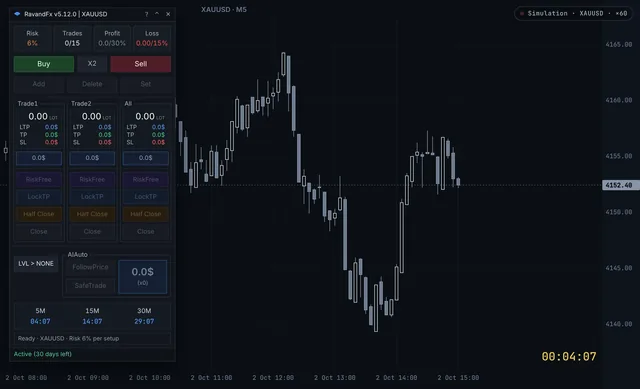
Drag the stop on the chart and the lot size is calculated instantly so the possible loss never exceeds the percent you set. A lot cap based on your balance also stops oversized trades with very tight stops.
Protect your profit
RiskFree moves the stop to entry plus costs, LockTP locks in a dollar profit, and when you're away from the chart the autopilot keeps managing the trade.
Practise without risk
Try the panel free in the online simulator, or run manual backtests on real historical data in the MetaTrader 5 Strategy Tester during your free trial.
Who it's for
Who RavandFX is built for
- Forex and gold traders who trade manually on MetaTrader 5 and want exact lot size and risk on every trade.
- Prop firm challengers for whom the daily loss limit and maximum drawdown are hard red lines.
- Scalpers who need speed: FastScalp enters and exits with one key, still at a calculated lot size.
- Traders who can't watch the chart all day who open the trade and hand its management to the autopilot.
- Newer traders who want to practise both strategy and discipline in the Strategy Tester and the simulator before real money.
- Index and stock CFD traders who trade indices and stock market CFDs through a broker in MetaTrader 5 and want the same money management rules.
Free trade tools and money management guides
MT5 Risk Management Simulator
Try every RavandFX feature on a live simulated gold chart, with your own money-management rules. No install, no risk.
Free toolLot size calculator for forex and gold
Get the right position size from your balance, risk % and stop loss, for forex pairs and gold.
Forex and stock market money management guides
Forex money management: 7 rules that protect your account
Seven forex money management rules that keep a trading account alive: risk per trade, position sizing, stop losses, daily loss limits and more.
Markets · 4 min readForex vs stock market: what changes for your money management
Forex vs stock market for traders: hours, leverage, costs, gaps and position size compared, and which money management rules stay the same in both markets.
Backtesting · 3 min readManual backtesting in the MT5 Strategy Tester
How to backtest a manual trading strategy in the MetaTrader 5 Strategy Tester: visual mode setup, trading by hand, money management and reading your results.
Position sizing · 5 min readHow to calculate lot size in forex and gold
Calculate lot size step by step: risk in dollars, stop distance and pip value, with EURUSD, USDJPY and gold examples, lot size tables and MT5 tick values.
Risk per trade · 4 min readThe 1% rule in trading
The 1% rule is the simplest money management rule: risk at most 1% of your account per trade. How it works, forex and gold examples, and when to risk less.
Prop firms · 5 min readProp firm daily loss limit: how not to break it
How prop firm daily loss limits work at FTMO and FundedNext, why floating losses break forex accounts, and a money management plan to stay inside the limit.
Prop firms · 4 min readHow to pass a prop firm challenge
Money management to pass a forex prop firm challenge: the math of the target and loss limits, a risk plan with numbers, and the mistakes that fail most traders.
Trading psychology · 3 min readRevenge trading: why it happens and how to stop it
What revenge trading in forex looks like, why it is so hard to resist after a loss, and six money management rules that stop it before it costs you the account.
Trade management · 2 min readBreakeven stop loss: when to move it, and when not to
Breakeven is the first way to lock profit in forex: when to move your stop to breakeven, why the real breakeven includes costs, and how not to exit too early.
Money management · 4 min readHow to lock in profits in forex
How to lock in profits in forex without killing good trades: breakeven, locking a dollar amount, partial close, trailing stop and a daily profit target.
Tools compared · 4 min readMT5 risk management tools compared
MT5 money management and trade tools compared: Trade Assistant, Trade Manager Interface, Position Sizer and RavandFX. Lot sizing, daily limits and price.
Privacy and security
- We never ask for your MetaTrader login or broker password.
- We have no access to your account or your money; the assistant runs on your own MetaTrader.
- No trade is ever opened outside the rules you set.
Questions about RavandFX
What is RavandFX?
RavandFX is a money-management assistant for MetaTrader 5 that locks your rules into your licence and enforces them on every trade: risk per trade, daily loss and profit limits, trades per day and a pause after each trade. Its panel on your chart calculates lot size from your risk, places entry, stop and target, and manages the trade.
Does RavandFX work on the stock market too?
RavandFX works on any symbol your broker offers in MetaTrader 5: forex pairs, gold, indices and stock market CFDs. Lot size comes from that symbol's tick value, and your money management rules apply the same way on all of them. It does not work on exchanges or platforms outside MetaTrader 5.
Can I change my rules later?
Yes, within limits. Making a rule stricter is allowed at any time and applies immediately. Any other change, such as raising your risk, is allowed once a month, takes effect 24 hours after you ask, and can be cancelled before then. It is there to fix a mistake, not to undo your plan in a bad moment. When you renew, you can choose new rules.
Is RavandFX a trading robot or a signal service?
No. You always choose the direction and the entry, and you always open the first trade yourself. RavandFX is a money and trade management tool and does not guarantee profit.
Which platform does it run on?
On any computer that runs desktop MetaTrader 5: Windows, macOS, Linux or a VPS. The MT5 phone apps can't run Expert Advisors. If you want trades managed while your computer is off, use a VPS.
Can I try it before buying?
Yes, in two ways: the online simulator with no install, and a 3-day free trial with every feature on your own account. During the trial you can also use it in the MetaTrader 5 Strategy Tester on real historical data.
Is it suitable for prop firm accounts?
Yes. Set your daily loss limit, trade limit and risk per trade below your prop firm's limits and the panel stops you before you reach them. Always read your own firm's rules too.
How much does RavandFX cost?
After the 3-day free trial, a 1-month licence is $39, 3 months $99 and 6 months $149. Every plan includes every feature, and nothing renews automatically.
Ravand trading journal
A place to log and review your trades, so you can see your patterns and learn from every trade.